//Station
介绍

车站用于停止和启动列车,可设置停止时间(以秒为单位)。车站会将红石信号输入的方向作为列车的启动方向,当两边都有红石信号输入时,车站会自动设置列车的启动方向。
语法

第一行
使用 [train] 时,列车的中心位置(比如列车中间的矿车)会停在车站牌的上方。当使用 [cart] 时,列车会立即停止,第一辆矿车会停在车站牌的上方。
第二行
Station followed up by an optional number. This number sets the distance to launch the trains at. The higher this number, the slower it will launch. Use only station to make the plugin calculate this distance automatically. Then it launches the train towards the first curved track piece up to 100 blocks away.
You can also specify a 'center offset' value, which changes where the train will stop on the station. This is done by specifying <distance>m, for example '20.5m'.
The below station sign will launch a train 30 blocks away, and center the train with a 12.5 block offset above the sign. The train waits for 10 seconds and then continues:
Third line
An optional delay in seconds. This delay is used when launching. For example, when the right side is powered and a delay of 3 seconds is set, and a train enters, the train will wait for 3 seconds and then launch into the powered direction.
Fourth line
Sets the mode used when both sides are powered. The station sign will launch trains into the direction that is powered. If the sign receives no power whatsoever, it is not active and trains will travel right through. The inverted redstone option ([!train]) is still active here, so if power is inverted and the sign receives no power, it is as if all sides a powered.
The station will hold the train forever if both sides are powered, unless one of the below four types is set on the fourth line:
| Sign | Result |
|---|---|

| |

| |

| |

|


Auto Routing
Instead of specifying a fixed direction, route can be put instead. This will make the station sign part of the path finding network, and launches the train into the most appropriate direction to reach its destination.
This will route the train to its destination, if set. Otherwise, resumes the train in the same direction it was approaching the station.
Launch Speed
A number can also be put on the fourth line to set the launch speed of the station sign.
Lever Output
While a train is waiting on the station, the station toggles levers attached to the same block the station sign is attached to. This can be used to, for example, change the player exit property, open doors or automatically eject the players inside.
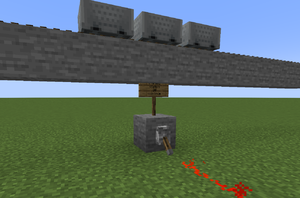
Lever is toggled while a train waits on a station
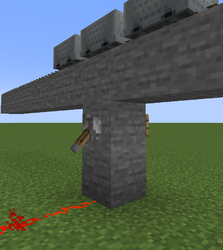
Alternative setup with a wall sign
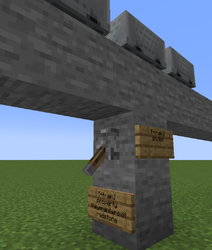
Station output is used to automatically enable/disable players entering and exiting the train


Examples
Shuttle-run
