//Station
概要

Stationサインは駅を作ることができ、駅では秒数を設定して列車を停めたり発車させたりすることができます。レッドストーン信号で発車する方向を設定できますが、両側から信号が来ている場合は自動動作が行われます。
記法

一行目
[train]を書いた場合、サインの真上部分には列車のちょうど真ん中のトロッコがくるように停車します。[cart]の場合は、列車が通過する際に先頭のトロッコが即座に停車します。
二行目
stationに加え、引数を追加で指定できます。引数は列車を発車させる距離を指定でき、この数字が大きいほど、ゆっくり動き出します。stationだけを記述した場合、プラグイン側で自動的に距離の計算が行われます。計算は、百ブロック先のカーブまで勘案に入れられます。
また『センターオフセット』の数値を指定すると、駅に停車する列車の位置を調整することができます。センターオフセットは20.5mのように、<距離>mと記述します。
次のStationサインの例では、停車時の車両の中心位置を12.5ブロックのオフセットに指定します。また、10秒間停車した後、30ブロック先へ向けて発車します。
三行目
どのくらいここで待機させるかの遅延を任意で指定できます。たとえば、看板の右側から電源が供給されており、遅延が3秒に設定されている場合、入ってきた列車は3秒間待機してから電源の方向へ発進します。
四行目
看板の両側から電源が入力されている場合の発車方向を指定します。Stationサインは通常、列車を発進させる際は電源が供給されている方向へ発進させます。もしサインに電源供給がなく起動していない場合は、駅として機能せずに列車はそこをスルーして進みます。[!train]で反転モードになっている場合などは電源供給がなくても起動していますが、その場合はすべての面から供給されているようにふるまいます。
The station will hold the train forever if both sides are powered, unless one of the below four types is set on the fourth line:
| Sign | Result |
|---|---|
[train] station 5 1 left |

|
[train] station 5 1 right |

|
[train] station 5 1 continue |

|
[train] station 5 1 reverse |

|
Auto Routing
Instead of specifying a fixed direction, route can be put instead. This will make the station sign part of the path finding network, and launches the train into the most appropriate direction to reach its destination.
This will route the train to its destination, if set. Otherwise, resumes the train in the same direction it was approaching the station.
Launch Speed
A number can also be put on the fourth line to set the launch speed of the station sign.
Lever Output
While a train is waiting on the station, the station toggles levers attached to the same block the station sign is attached to. This can be used to, for example, change the player exit property, open doors or automatically eject the players inside.
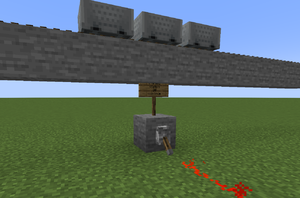
Lever is toggled while a train waits on a station
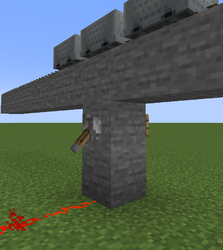
Alternative setup with a wall sign
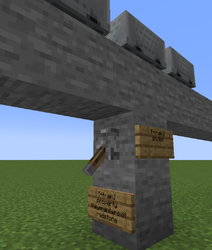
Station output is used to automatically enable/disable players entering and exiting the train


Examples
Shuttle-run
