//Station
Saihou-Heiki (talk | contribs) (Created page with "=== 二行目 ===") |
Saihou-Heiki (talk | contribs) (Created page with "File:TrainCarts-Shuttle-run.gif") |
||
| (12 intermediate revisions by the same user not shown) | |||
| Line 17: | Line 17: | ||
=== 二行目 === | === 二行目 === | ||
''station''に加え、引数を追加で指定できます。引数は列車を発車させる距離を指定でき、この数字が大きいほど、ゆっくり動き出します。''station''だけを記述した場合、プラグイン側で自動的に距離の計算が行われます。計算は、百ブロック先のカーブまで勘案に入れられます。 | |||
'' | |||
また『センターオフセット』の数値を指定すると、駅に停車する列車の位置を調整することができます。センターオフセットは'''20.5m'''のように、'''<距離>m'''と記述します。 | |||
次のStationサインの例では、停車時の車両の中心位置を12.5ブロックのオフセットに指定します。また、10秒間停車した後、30ブロック先へ向けて発車します。 | |||
{{sign|[+train]|station 30 12.5m|10|continue}} | {{sign|[+train]|station 30 12.5m|10|continue}} | ||
=== 三行目 === | |||
=== | |||
どのくらいここで待機させるかの遅延を任意で指定できます。たとえば、看板の右側から電源が供給されており、遅延が3秒に設定されている場合、入ってきた列車は3秒間待機してから電源の方向へ発進します。 | |||
=== 四行目 === | |||
=== | |||
看板の両側から電源が入力されている場合の発車方向を指定します。Stationサインは通常、列車を発進させる際は電源が供給されている方向へ発進させます。もしサインに電源供給がなく起動していない場合は、駅として機能せずに列車はそこをスルーして進みます。''[!train]''で反転モードになっている場合などは電源供給がなくても起動していますが、その場合はすべての面から供給されているようにふるまいます。 | |||
Stationサインは両側から電源が供給されている時、四行目に指定がない場合は半永久的にそこに列車を留めます。指定されている場合は、次のような動作を行います。 | |||
{| class="wikitable" | {| class="wikitable" | ||
|- | |- | ||
! scope="col" | | ! scope="col" | サイン | ||
! scope="col" | | ! scope="col" | 結果 | ||
|- | |- | ||
| {{sign|[train]|station 5|1|left}} | | {{sign|[train]|station 5|1|left}} | ||
| Line 67: | Line 51: | ||
| [[Image:TrainCarts station reverse.gif|Image:TrainCarts station reverse.gif]] | | [[Image:TrainCarts station reverse.gif|Image:TrainCarts station reverse.gif]] | ||
|} | |} | ||
==== 自動的なルート設定 ==== | |||
==== | 方向を指定するかわりに、<code>route</code>を指定することもできます。Stationサインは[[Special:MyLanguage/TrainCarts/PathFinding|経路探索ネットワーク]]の一部として組み込まれ、列車をその目的地のへ向かう最も適した方向へ進ませます。 | ||
これは列車に目的地が設定されているときには、サインはそちらへルートを設定します。指定がされていなかった場合、列車はStationサインへ入った際の方向がそのまま維持されます。 | |||
{{sign|[train]|station||route continue}} | {{sign|[train]|station||route continue}} | ||
==== 発車速度 ==== | |||
==== | 四行目に数字を指定すると、Stationサインが発車させるときの速度を設定することが可能です。 | ||
{{sign|[train]|station||0.4}} | {{sign|[train]|station||0.4}} | ||
| Line 89: | Line 66: | ||
{{sign|[train]|station|5|continue 0.4}} | {{sign|[train]|station|5|continue 0.4}} | ||
== レバー出力 == | |||
列車が駅で待機している際、Stationサインは返り値として同じブロックに接続されているレバーの状態を切り替えます。この機能は、たとえば[[Special:MyLanguage/TrainCarts/Signs/Property|playerexitプロパティ]]や駅のドアの自動開閉、[[Special:MyLanguage/TrainCarts/Signs/Ejector|Ejectorサインによる自動下車]]などと組み合わせることができます。 | |||
<gallery widths=300px heights=250px> | <gallery widths=300px heights=250px> | ||
File:Tc_station_lever_one.png| | File:Tc_station_lever_one.png|列車が駅で待機している時、同じブロックに接続されたレバーが切り替えられます。|alt=alt language | ||
File:Tc_station_lever_two.png| | File:Tc_station_lever_two.png|壁に看板を貼り付けた際の異なる実装。|alt=alt language | ||
File:Tc_station_enterexit.png| | File:Tc_station_enterexit.png|Stationサインのアウトプットを用い、プレイヤーが列車に乗り降りできるかを自動で切り替えます。 | ||
</gallery> | </gallery> | ||
== 例 == | |||
= | |||
=== シャトルラン === | |||
=== | |||
[[File:TrainCarts-Shuttle-run.gif|File:TrainCarts-Shuttle-run.gif]] | [[File:TrainCarts-Shuttle-run.gif|File:TrainCarts-Shuttle-run.gif]] | ||
Latest revision as of 03:25, 28 July 2026
概要

Stationサインは駅を作ることができ、駅では秒数を設定して列車を停めたり発車させたりすることができます。レッドストーン信号で発車する方向を設定できますが、両側から信号が来ている場合は自動動作が行われます。
記法

一行目
[train]を書いた場合、サインの真上部分には列車のちょうど真ん中のトロッコがくるように停車します。[cart]の場合は、列車が通過する際に先頭のトロッコが即座に停車します。
二行目
stationに加え、引数を追加で指定できます。引数は列車を発車させる距離を指定でき、この数字が大きいほど、ゆっくり動き出します。stationだけを記述した場合、プラグイン側で自動的に距離の計算が行われます。計算は、百ブロック先のカーブまで勘案に入れられます。
また『センターオフセット』の数値を指定すると、駅に停車する列車の位置を調整することができます。センターオフセットは20.5mのように、<距離>mと記述します。
次のStationサインの例では、停車時の車両の中心位置を12.5ブロックのオフセットに指定します。また、10秒間停車した後、30ブロック先へ向けて発車します。
三行目
どのくらいここで待機させるかの遅延を任意で指定できます。たとえば、看板の右側から電源が供給されており、遅延が3秒に設定されている場合、入ってきた列車は3秒間待機してから電源の方向へ発進します。
四行目
看板の両側から電源が入力されている場合の発車方向を指定します。Stationサインは通常、列車を発進させる際は電源が供給されている方向へ発進させます。もしサインに電源供給がなく起動していない場合は、駅として機能せずに列車はそこをスルーして進みます。[!train]で反転モードになっている場合などは電源供給がなくても起動していますが、その場合はすべての面から供給されているようにふるまいます。
Stationサインは両側から電源が供給されている時、四行目に指定がない場合は半永久的にそこに列車を留めます。指定されている場合は、次のような動作を行います。
| サイン | 結果 |
|---|---|
[train] station 5 1 left |

|
[train] station 5 1 right |

|
[train] station 5 1 continue |

|
[train] station 5 1 reverse |

|
自動的なルート設定
方向を指定するかわりに、routeを指定することもできます。Stationサインは経路探索ネットワークの一部として組み込まれ、列車をその目的地のへ向かう最も適した方向へ進ませます。
これは列車に目的地が設定されているときには、サインはそちらへルートを設定します。指定がされていなかった場合、列車はStationサインへ入った際の方向がそのまま維持されます。
発車速度
四行目に数字を指定すると、Stationサインが発車させるときの速度を設定することが可能です。
レバー出力
列車が駅で待機している際、Stationサインは返り値として同じブロックに接続されているレバーの状態を切り替えます。この機能は、たとえばplayerexitプロパティや駅のドアの自動開閉、Ejectorサインによる自動下車などと組み合わせることができます。
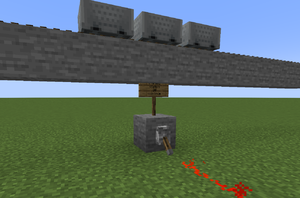
列車が駅で待機している時、同じブロックに接続されたレバーが切り替えられます。
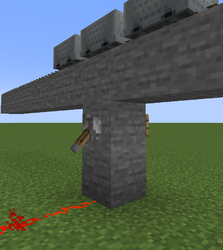
壁に看板を貼り付けた際の異なる実装。
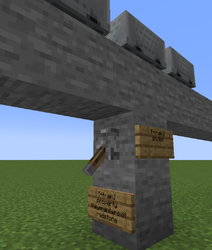
Stationサインのアウトプットを用い、プレイヤーが列車に乗り降りできるかを自動で切り替えます。


例
シャトルラン
