//Station
(Created page with "设置两侧都有红石信号时使用的发车模式。车站会将列车发往红石信号输入的方向一侧。如果车站完全没有激活,列车会直接通过车站。反转模式([!train])在此处仍然有效,因此如果信号反转且车站牌没被激活,则会判定为所有方向都有红石信号。") |
(Created page with "若两侧都为红石信号输入侧,则列车会永远停靠在该车站,除非第四行设置为以下四种类型之一: {| class="wikitable" |- ! scope="col" | 车站牌 ! scope="col" | 结果 |- | thumb | Image:TrainCarts station left.gif |- | thumb | Image:TrainCarts station right.gif |- | thumb | Image:TrainCarts station...") |
||
| Line 34: | Line 34: | ||
设置两侧都有红石信号时使用的发车模式。车站会将列车发往红石信号输入的方向一侧。如果车站完全没有激活,列车会直接通过车站。反转模式([!train])在此处仍然有效,因此如果信号反转且车站牌没被激活,则会判定为所有方向都有红石信号。 | 设置两侧都有红石信号时使用的发车模式。车站会将列车发往红石信号输入的方向一侧。如果车站完全没有激活,列车会直接通过车站。反转模式([!train])在此处仍然有效,因此如果信号反转且车站牌没被激活,则会判定为所有方向都有红石信号。 | ||
若两侧都为红石信号输入侧,则列车会永远停靠在该车站,除非第四行设置为以下四种类型之一: | |||
{| class="wikitable" | {| class="wikitable" | ||
|- | |- | ||
! scope="col" | | ! scope="col" | 车站牌 | ||
! scope="col" | | ! scope="col" | 结果 | ||
|- | |- | ||
| [[File:Sign 1.png|thumb]] | | [[File:Sign 1.png|thumb]] | ||
| Line 53: | Line 52: | ||
| [[Image:TrainCarts station reverse.gif|Image:TrainCarts station reverse.gif]] | | [[Image:TrainCarts station reverse.gif|Image:TrainCarts station reverse.gif]] | ||
|} | |} | ||
<div lang="en" dir="ltr" class="mw-content-ltr"> | <div lang="en" dir="ltr" class="mw-content-ltr"> | ||
Revision as of 03:21, 25 November 2025
介紹

車站用於停止和啟動列車,可設置停止時間(以秒為單位)。車站會將紅石信號輸入的方向作為列車的啟動方向,當兩邊都有紅石信號輸入時,車站會自動設置列車的啟動方向。
語法

第一行
使用 [train] 時,列車的中心位置(比如列車中間的礦車)會停在車站牌的上方。當使用 [cart] 時,列車會立即停止,第一輛礦車會停在車站牌的上方。
第二行
Station,後可跟數值。這個數值表示列車的啟動距離。數值越高,啟動速度就越慢。不加數值則插件會自動計算啟動距離,此時會將列車啟動到最遠 100 格方塊內的第一個彎軌道上。
你還可以指定「中心偏移量」,用於改變列車停靠車站的位置。通過指定 <距離數值>m 來修改,例如 「20.5m」。
下面的車站將會啟動列車到30格方塊外,且列車停靠車站時列車中心相對於車站牌偏移12.5格方塊。列車將等待10秒,然後啟動:
第三行
可選的停止時間(以秒為單位)。停止時間應用於啟動時。例如,當紅石從右側激活車站牌且車站牌設置了 3 秒停止時間時,當有列車駛入時,列車將等待 3 秒,之後朝右側(紅石信號輸入方向)駛出。
第四行
設置兩側都有紅石信號時使用的發車模式。車站會將列車發往紅石信號輸入的方向一側。如果車站完全沒有激活,列車會直接通過車站。反轉模式([!train])在此處仍然有效,因此如果信號反轉且車站牌沒被激活,則會判定為所有方向都有紅石信號。
若兩側都為紅石信號輸入側,則列車會永遠停靠在該車站,除非第四行設置為以下四種類型之一:
| 車站牌 | 結果 |
|---|---|

| |

| |

| |

|


Auto Routing
Instead of specifying a fixed direction, route can be put instead. This will make the station sign part of the path finding network, and launches the train into the most appropriate direction to reach its destination.
This will route the train to its destination, if set. Otherwise, resumes the train in the same direction it was approaching the station.
Launch Speed
A number can also be put on the fourth line to set the launch speed of the station sign.
Lever Output
While a train is waiting on the station, the station toggles levers attached to the same block the station sign is attached to. This can be used to, for example, change the player exit property, open doors or automatically eject the players inside.
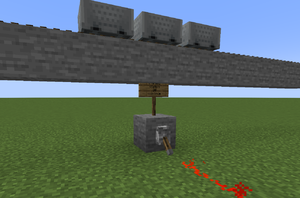
Lever is toggled while a train waits on a station
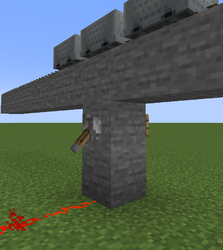
Alternative setup with a wall sign
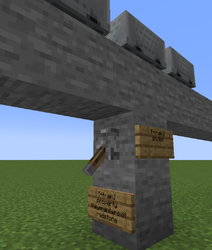
Station output is used to automatically enable/disable players entering and exiting the train


Examples
Shuttle-run
